

The pipeline board
Updated November 13, 2026
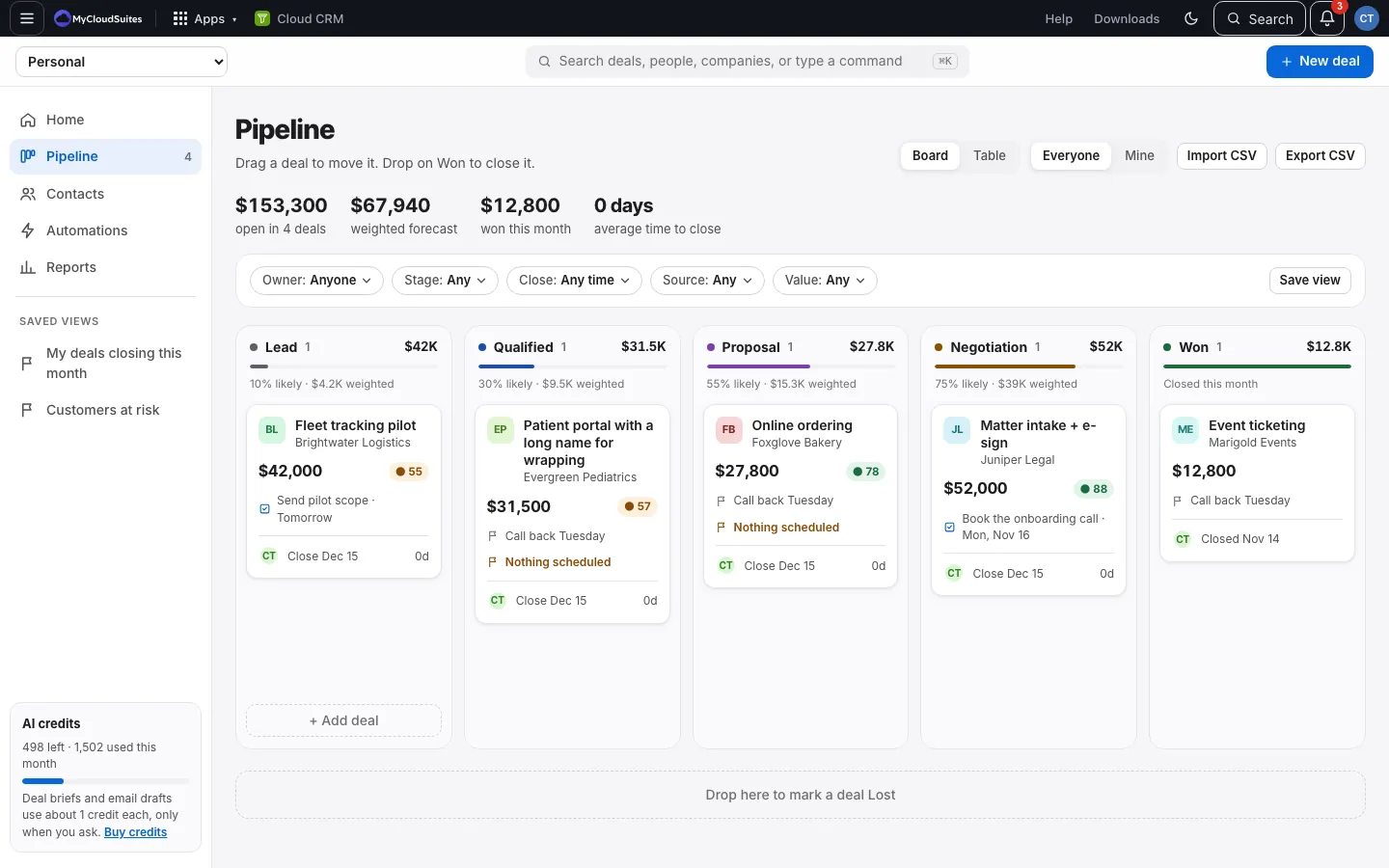
The board shows every open deal as a card, in a column for each stage.
How it works
- At the top: open value and count, the weighted forecast, won this month, and the average time to close.
- Each column shows its count, total and weighted value.
- Won shows the deals won this month (“Closed this month”).
- Each card shows the deal, its company, value, health score, its next task (or next step), owner and close date. An open deal with nothing scheduled says so in amber; see See which deals have nothing scheduled.
- Above the columns, filters narrow the board by owner, stage, close date, source or value; see Filter the pipeline and contacts.
Move a deal
- Drag a card to another column to change its stage.
- Drop it on Won to close it as won. See Win or lose a deal.
- Drop it on Drop here to mark a deal Lost, below the board, to mark it lost.
Drag a card up or down inside a column to put it in the order you like. The order is kept.
Good to know
- On a phone you don’t drag. See Move deals on a phone.
- Everyone and Mine at the top switch between all deals and just yours.
- Lost deals aren’t on the board. They’re in the table, where you can reopen them.
- Deals in a currency other than your main one keep their own amounts on their cards, but aren’t added into the totals. See Currencies.