Cloud Books by MyCloudSuites

BetaFree

Cloud Books is in beta: it works, it’s free, and it’s updated often while we finish it. Tell us what you find.

Bookkeeping for your business, free

Invoices, bills, bank and reports in one place, on a real double-entry ledger. Unlimited invoices and customers, with nothing to pay.

Cloud Books is made for a computer. On a phone, send yourself the link and open it there.

In Chrome, Edge, Firefox and Safari, or the Windows app. Your books are kept in your MyCloudSuites account, so you can reach them from any computer.

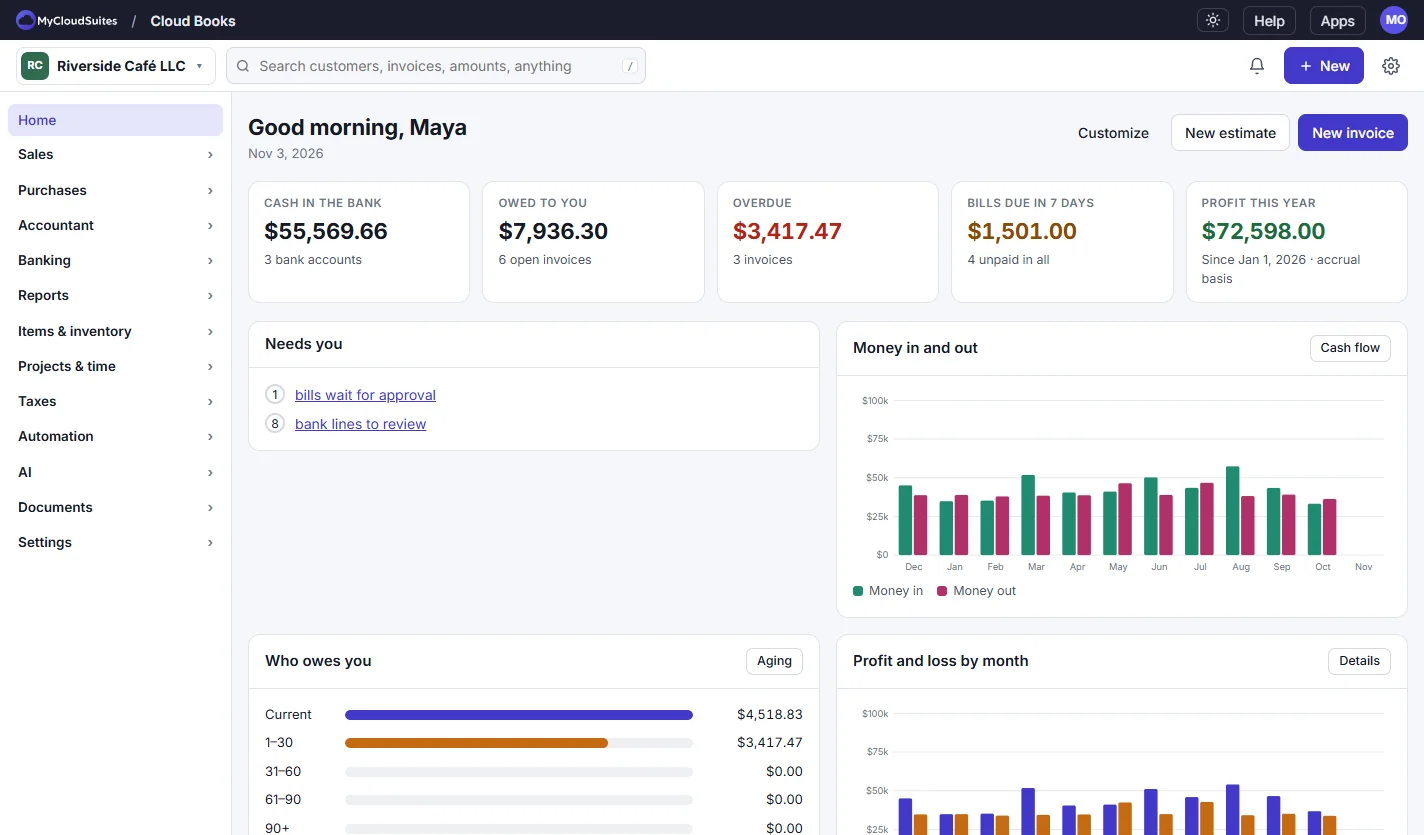
Cloud Books home for a café: cash in the bank, owed to you, overdue, bills due in 7 days and profit this year, with a 12-month money in and out chart and a list of what needs you
  • Unlimited invoices and customers, free
  • Nothing reaches your books until you confirm it
  • Bring your books from QuickBooks, Zoho or Quicken
  • Every change kept in an audit log

Everything your books need.

From the first invoice to the year-end reports, for a business of one or a team.

Invoices and estimates.

Estimates, invoices, deposits, credit notes and sales receipts, recurring invoices, reminders and late fees, and a link your customer can open.

Bills and expenses.

Bills with approvals, expenses, checks, purchase orders and recurring bills, a receipt inbox, mileage, and a 1099 summary at year end.

Bank and reconcile.

Import statements, match each line to an invoice or bill or a category, and reconcile month by month. Rules and “like last time” do the repeats.

Reports.

Two dozen reports, from profit and loss and the balance sheet to aging and sales tax, cash or accrual, plus a report builder and scheduled emails.

Your team and your accountant.

Owner, Admin, Standard, Accountant and View only roles, or your own. Accountants get journals, budgets, closing and a lock date.

Ask Books.

Ask about your numbers in plain words, or drop in a bill or receipt. Anything that changes your books waits for your OK. It uses AI credits.

See it in action.

These are real screenshots of Cloud Books, with a sample café’s books. Click any picture to see it full size.

Invoices

Build an invoice and see it as your customer will.

Add your items and services, and the sales tax works itself out. The preview beside it is exactly what your customer gets.

  • Estimates turn into invoices in one click
  • Recurring invoices, reminders and late fees
  • Save as PDF, or copy a link your customer can open
  • Your logo, colors and wording on every one
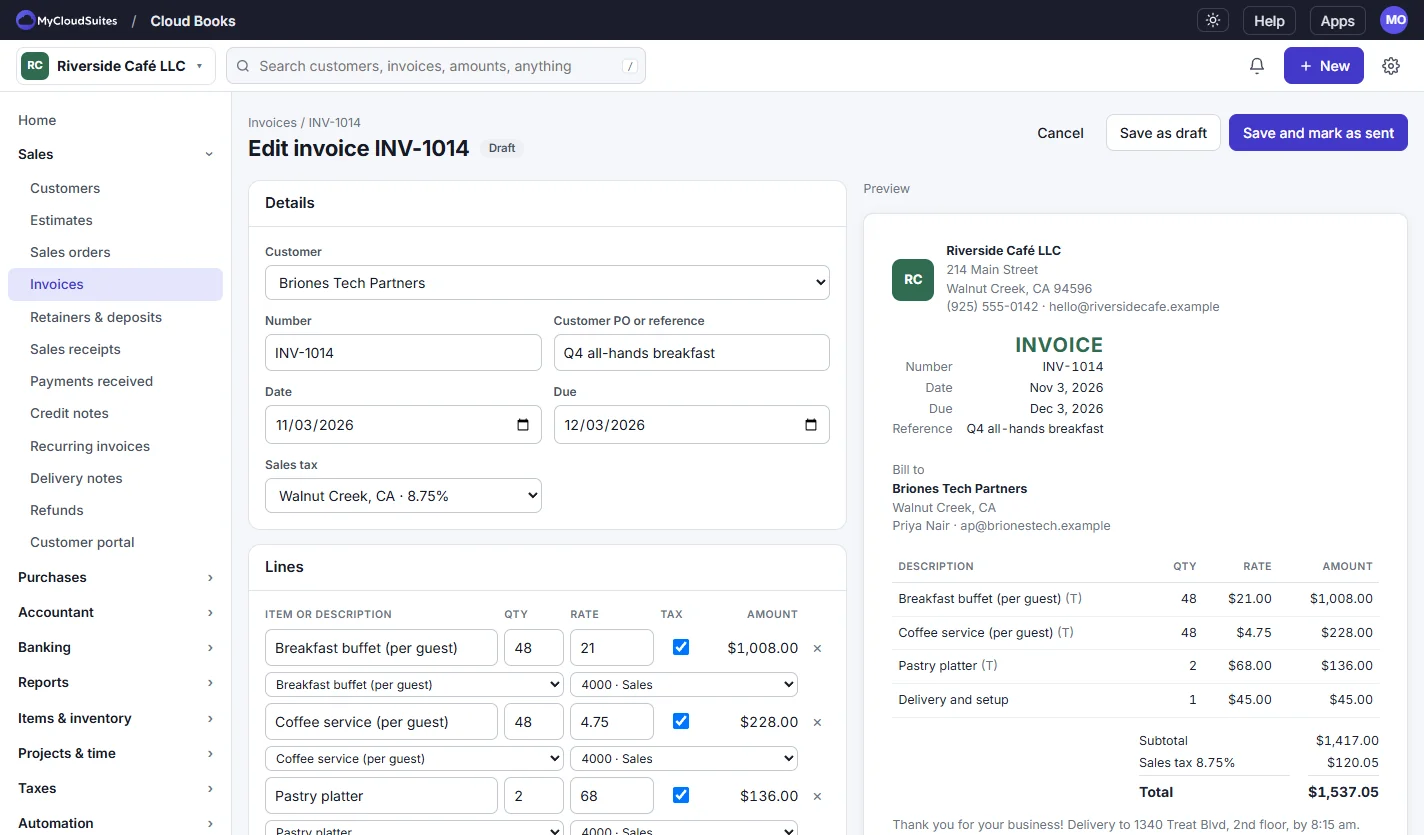
Editing a draft invoice for a catering customer: breakfast buffet, coffee service and pastry platter lines with 8.75% sales tax, next to a live preview with the total
Banking

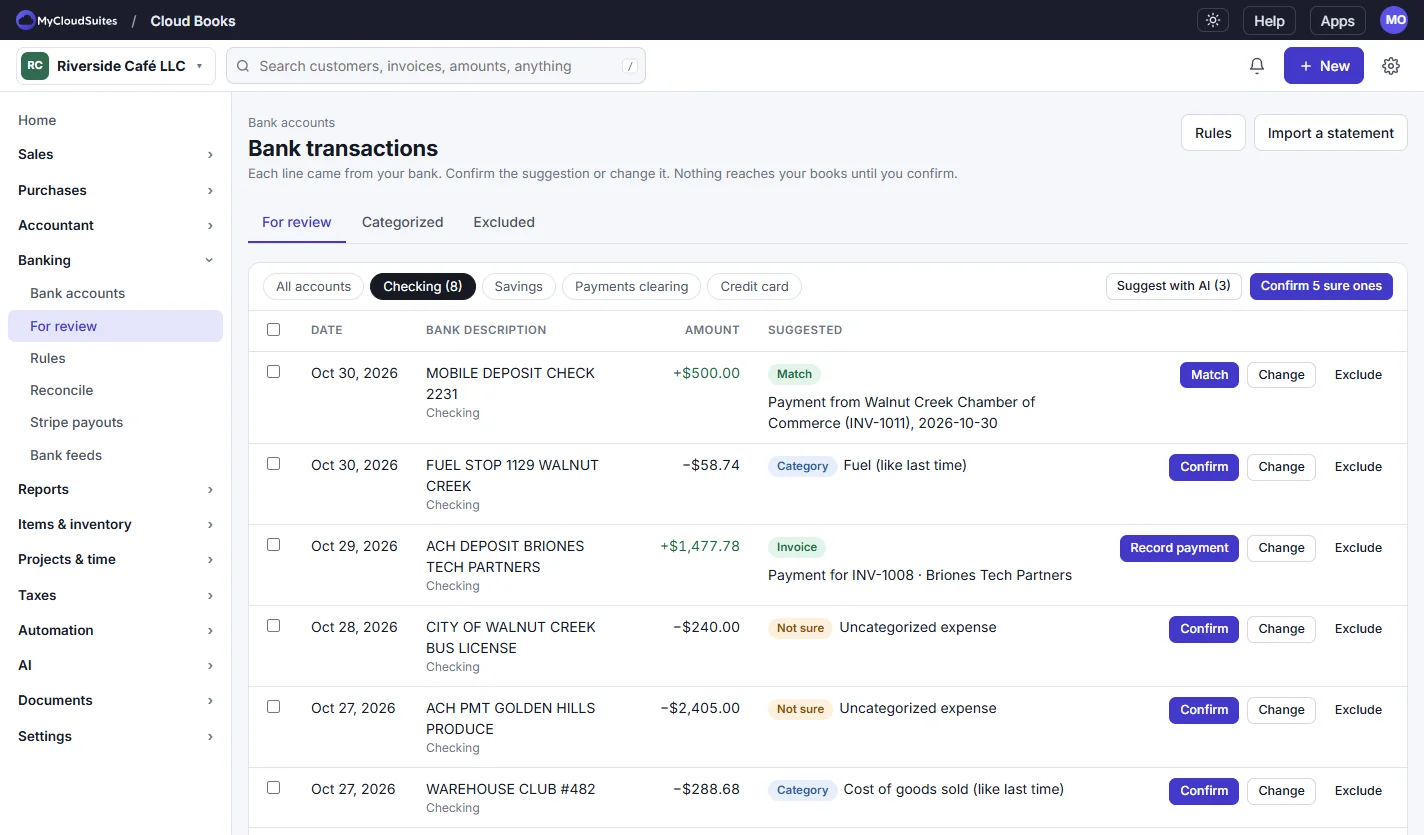
Every bank line gets a suggestion.

Import a statement and each line comes with a match: a payment on an invoice, a bill, or the category you used last time. Nothing posts until you confirm it.

  • Statements as .csv, .ofx, .qfx or .qif, with duplicates skipped
  • Match, split, transfer or exclude, and undo any of it
  • Rules that confirm the lines you always confirm
  • Reconcile to zero, then the cleared lines lock
Bank transactions for review in a checking account: a deposit matched to an invoice payment, a fuel charge categorized like last time, and Match, Confirm, Record payment, Change and Exclude buttons
Bills

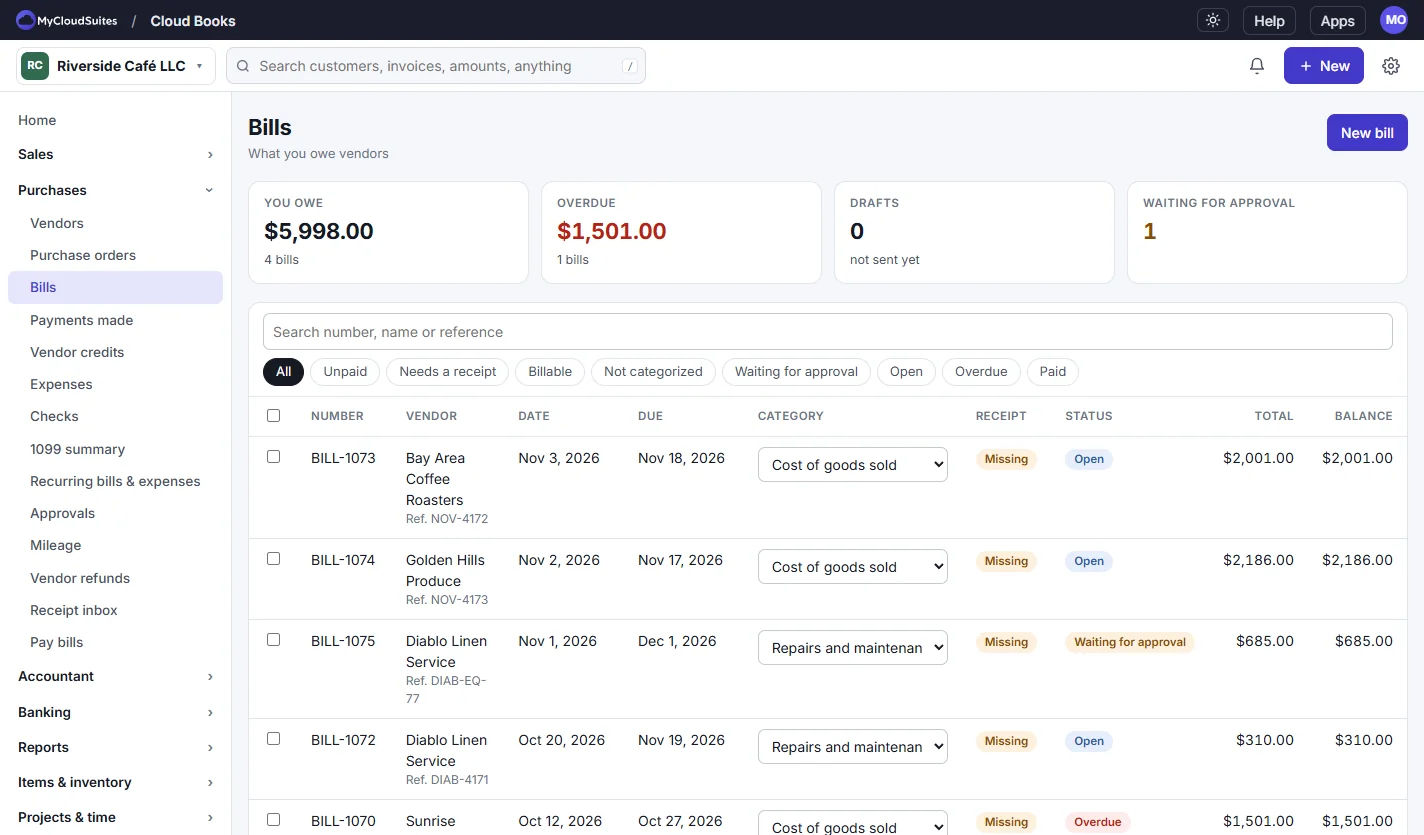
Know what you owe and when it’s due.

Every bill in one list with what’s overdue, what waits for approval and which ones still need a receipt.

  • Approvals before anything is paid
  • Attach receipts, or drop them in the receipt inbox
  • Pay bills by check or bank transfer file
  • Vendor credits, refunds and recurring bills
The Bills list showing the total owed, the overdue amount and one bill waiting for approval, with each bill’s vendor, dates, category, receipt and status
Reports

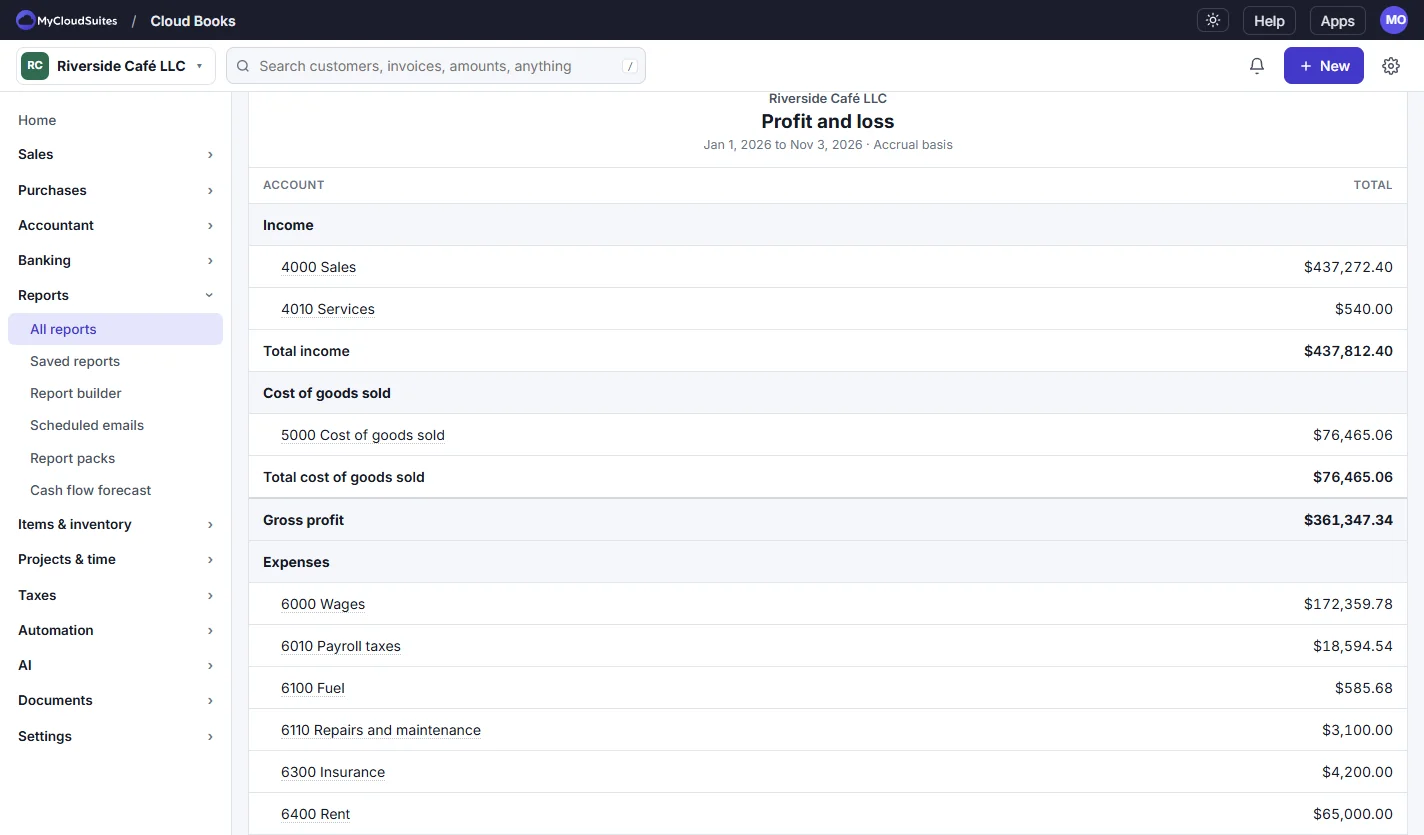
Profit and loss, always up to date.

Every report comes straight from the ledger, so it’s right the moment you confirm a line.

  • Profit and loss, balance sheet and cash flow
  • Aging, open invoices, unpaid bills and sales tax
  • Cash or accrual, by month, quarter, class or customer
  • Export to CSV or PDF, or open it in Cloud Sheets
A profit and loss report for the year to date: income, cost of goods sold, gross profit and expenses such as wages, payroll taxes, fuel, repairs, insurance and rent

How to get started

Four steps to books that keep themselves up to date.

Set up your business

Open Cloud Books, sign in with your MyCloudSuites account, enter your Business name and choose Start using Cloud Books.

Bring your books

In Settings › Import & export, choose Switch to Cloud Books, or import a bank statement from Banking.

Send an invoice

Choose New invoice, add your lines, then Save and mark as sent, and send the link or the PDF.

Review and reconcile

In Banking › For review, Confirm or Match each line, then Reconcile against your statement.

Bring your books with you.

Your history comes over, free, and everything goes out again whenever you want it.

Switch from

  • QuickBooks Online and QuickBooks Desktop
  • Zoho Books
  • Quicken (.qif)
  • A spreadsheet (.csv or .xlsx)

Bank statements

  • .csv, with your column choices remembered
  • .ofx and .qfx
  • .qif

Take it with you

  • Every report as CSV or PDF
  • Everything at once, as a ZIP

Questions

Is it really free?

Yes. Invoices, customers, bills, banking, reports and the switch from another app are free, with no limits on invoices or customers. MyCloudSuites Plus adds more room for attachments, and AI features use AI credits.

What does beta mean?

Cloud Books works and keeps real books today, and we’re still adding to it and changing it often. If something isn’t right, tell us and we’ll fix it.

Where are my books kept?

In your MyCloudSuites account, on our servers, backed up every night, so you and the people you invite can reach them from anywhere. Attachments are stored encrypted. Only you and the people you invite can see them, and you can export everything at any time.

Can my customers pay me online?

Not yet. Card and bank payments through your own Stripe account are being finished during the beta. Until then your customer’s link shows them how to pay you.

Does it connect to my bank?

Import your bank’s statements (.csv, .ofx, .qfx or .qif) for free. Live bank feeds that bring in each day’s lines by themselves are coming with MyCloudSuites Plus.

Can my accountant use it?

Yes. Invite them with the Accountant role and they get journal entries, budgets, fixed assets, closing and a lock date, and every change is in the audit log.

Which computers does it run on?

Any computer with Chrome, Edge, Firefox or Safari, at mycloudsuites.com/apps/books, and the Windows app, which opens the same books in a window of its own. A Mac app comes later.

Is anything missing?

Payroll isn’t in Cloud Books yet, and neither are online payments, live bank feeds or a Mac or phone app. Everything else on this page is there today.

Keep your books in Cloud Books.

Free in your browser, or in the Windows app, with the same books in both.