

A free PDF editor that does it all
Cloud PDF by MyCloudSuites edits the text and images already in your PDFs, fills and signs forms, adds comments, organizes pages, redacts, and turns scans into searchable text. It's free, with every feature included.
Needs a free MyCloudSuites account. Your files stay on your computer unless you save them to MyCloudSuites.
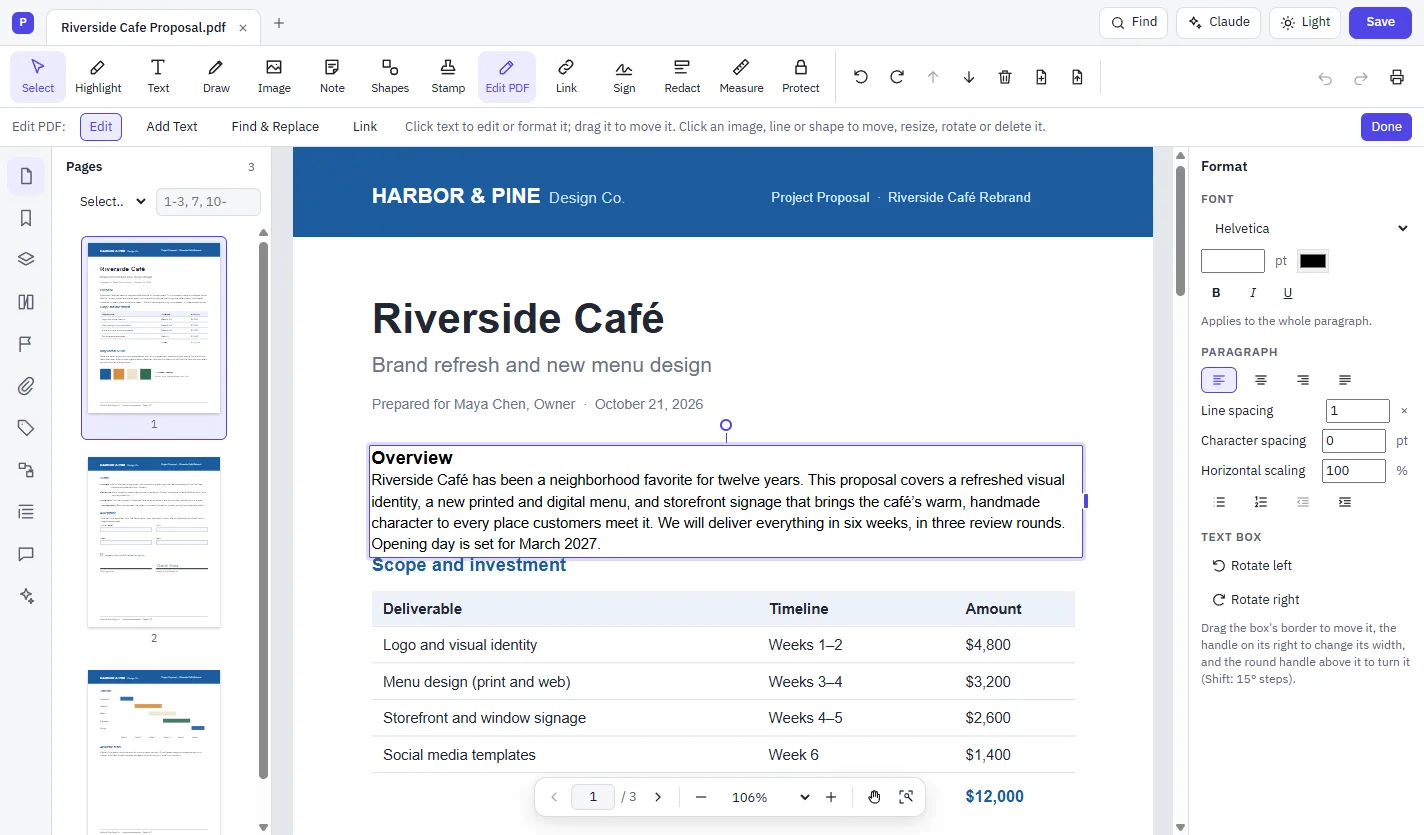
How to edit a PDF for free
Open your PDF
Open Cloud PDF in Chrome or Edge, or in the desktop app, and choose File › Open…
Choose Edit PDF
Choose Edit PDF on the toolbar, or Tools › Edit PDF (Ctrl+Shift+E).
Click and type
Click any text and type. The text below moves to make room. Drag pictures to move or resize them.
Save
Choose Done, then File › Save, or Save As… to keep the original.
Everything a PDF editor should do
The tools other editors charge for are included.
Edit text and images
Change words in the document's own font, reformat paragraphs, and move, crop, replace or delete pictures.
Fill and sign
Type into forms, add a typed, drawn or picture signature, or sign with a certificate-based digital ID.
Comment and review
Highlight, add notes, shapes and stamps, then reply and track each comment's status.
Organize pages
Reorder, rotate, delete, insert, extract and split pages, and combine several files into one.
Redact
Remove sensitive text and images for good, not just cover them, and strip hidden information.
Recognize text (OCR)
Turn a scan into text you can search, select, copy and edit, in many languages.
Compare versions
See changed words, formatting and pictures between two versions, marked on both.
Build forms
Add fields by hand or detect them on a flat form, with calculations and validation.
Protect
Lock a PDF with a password and AES-256 encryption, with optional printing and editing limits.
Free, and private
- Every MyCloudSuites app is free, on your computer and in your browser.
- Files are opened and saved on your own computer. Nothing is uploaded to MyCloudSuites unless you choose Save to MyCloudSuites (MyCloudSuites Plus).
- The files it saves open in Adobe Acrobat, Apple Preview, Chrome and Firefox.
- Includes Cloud Docs, an editor for Word documents, in the same app.
Runs where you work
- Windows 10 or 11 (64-bit)
- macOS 13 Ventura or later, on Apple silicon or Intel
- Current Chrome or Edge on a desktop or laptop, with nothing to install
- A few tools, like scanning and PDF to Word, are in the desktop app only. What works online
Questions
Is Cloud PDF really free?
Yes. Every MyCloudSuites app is free, with every feature included. You need a free account to open it in your browser or to download it.
Can I edit the text that's already in a PDF?
Yes. Choose Edit PDF, click a paragraph and type. Cloud PDF sets your changes in the document's own font when it can, or in a font installed on your computer, and moves the text below so nothing overlaps.
Can I edit a scanned PDF?
Yes. Run Recognize Text (OCR) first. The scan becomes searchable, selectable text, and you can then edit it like any other text.
Are my documents uploaded?
No. In the browser and on the desktop, Cloud PDF opens and saves files on your own computer. A document only leaves it when you ask the optional AI assistant a question, and only the pages you choose to share.
Do I need to install anything?
No. Cloud PDF runs in current Chrome or Edge at mycloudsuites.com/app. The desktop app for Windows and Mac adds a few tools a browser can't do, like scanning and converting to Word.
More free PDF tools
Edit your next PDF free.
Open Cloud PDF in your browser, or download it for Windows and Mac.