

Your Cloud Books plan and billing
Updated November 13, 2026
Cloud Books is free. Settings › Plan & billing shows your plan, what you pay this month, and how much room your files use.
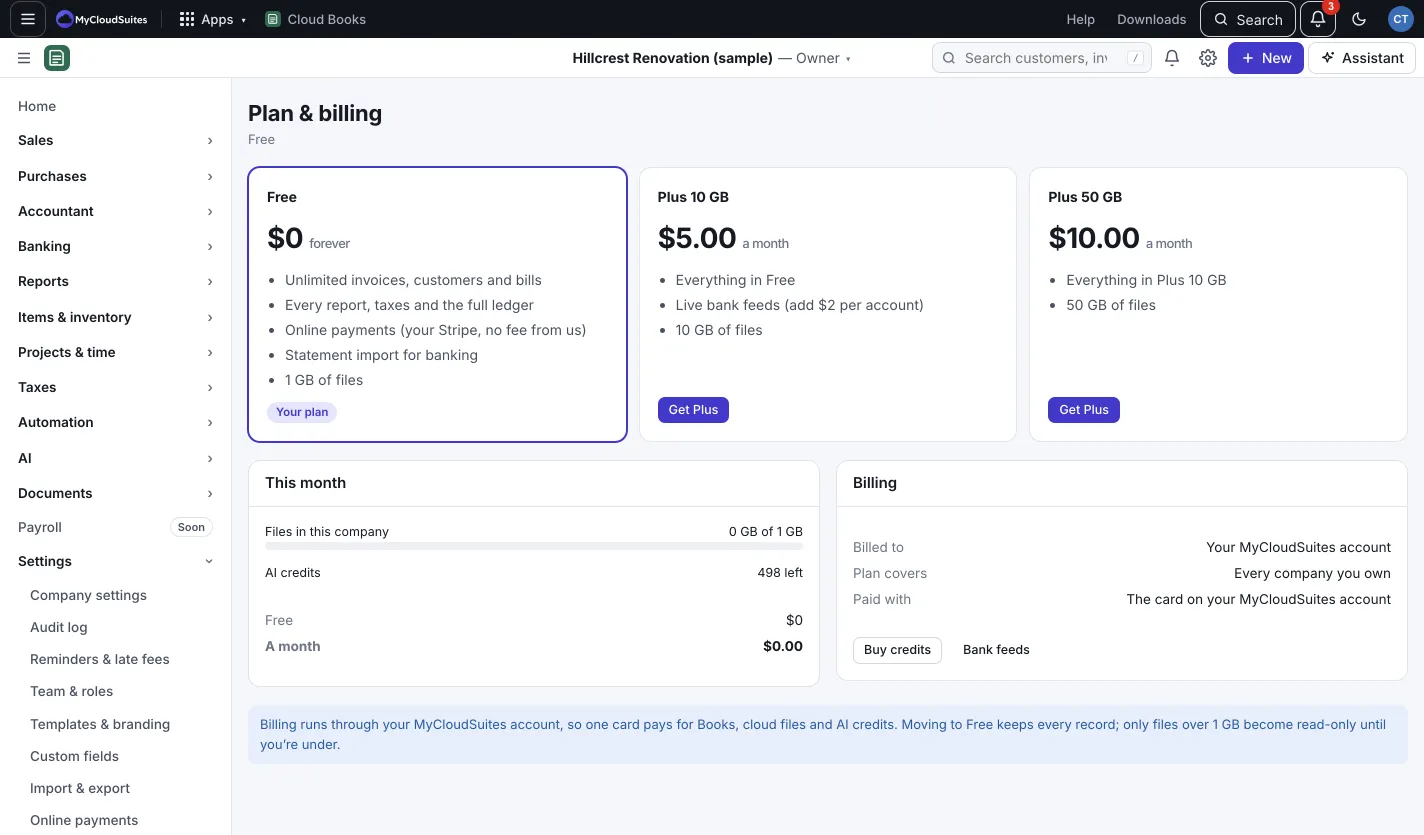
What each plan has
- Free: unlimited invoices, customers and bills, every report, taxes and the full ledger, online payments through your own Stripe account with no fee from us, statement import for banking, and 1 GB of files.
- Plus 10 GB: everything in Free, live bank feeds (add $2 per account), and 10 GB of files.
- Plus 50 GB: the same, with 50 GB of files.
The prices show on the page. See MyCloudSuites Plus.
Get or change Plus
Only the company’s owner can change the plan, because it comes from the owner’s MyCloudSuites account. One plan covers every company you own.
- Press Get Plus on the plan you want, and pay on Stripe’s secure page.
- To change later, press Switch on the other plan. To stop, press Move to Free.
- Press Manage billing to change your card or see invoices.
This month
This month shows Files in this company, your AI credits left, your plan, and a line for each live bank feed you pay for. Press Buy credits for more AI credits. See AI credits.
Good to know
- Moving to Free keeps every record. Files over 1 GB become read-only until you’re under, and live bank feeds stop updating.
- Billing runs through your MyCloudSuites account, so one card pays for Books, cloud files and AI credits.