

Weekly overtime warnings
Updated November 13, 2026
Overtime is cheaper to avoid than to pay. Cloud Time shows it in two places before it happens.
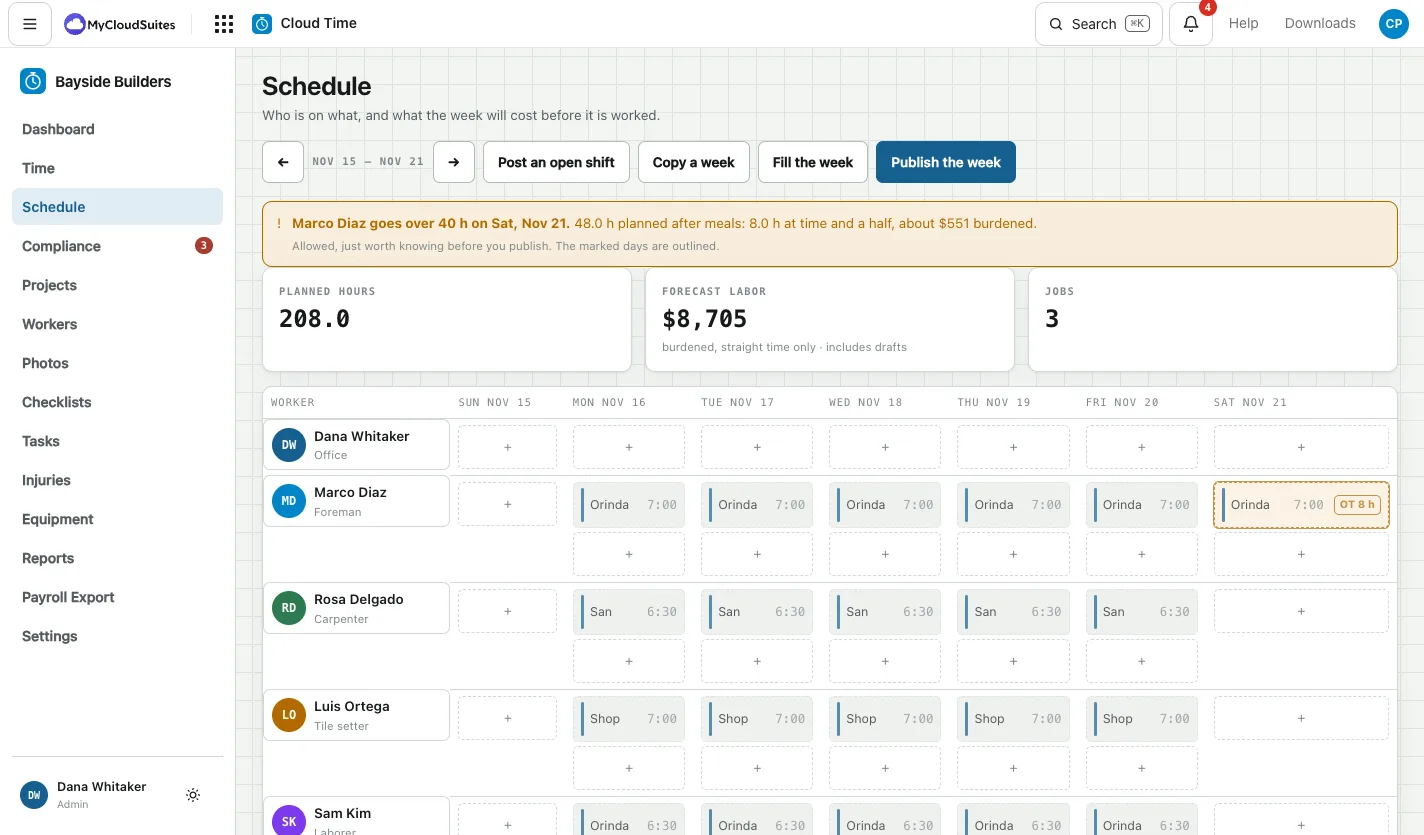
On the Schedule
When the plan puts someone past the weekly limit, a warning above the grid says who, on which day, how many hours are planned after meals, how many are overtime and about what they cost at the full cost of that worker. The day is outlined and marked OT with the hours.
It’s allowed, just worth knowing before you publish.
On the Dashboard
Heading into weekly overtime lists anyone close to the limit this week:
- Already past the limit, with the overtime so far.
- On the clock now, with about when they’ll reach the limit.
- Hours worked plus hours planned, and the day they’d go over.
- Otherwise, how many hours are left before overtime.
These come from the same rules that work out payroll. Exempt staff aren’t listed.
Good to know
- The weekly limit comes from Settings, under Overtime defaults, and your state’s rules. See Break and overtime rules.
- Daily overtime is worked out on each shift as it’s worked, and shows on the Time screen.