

Count doors and windows with Takeoff
Updated November 13, 2026
Takeoff counts what’s in the plan. It’s free.
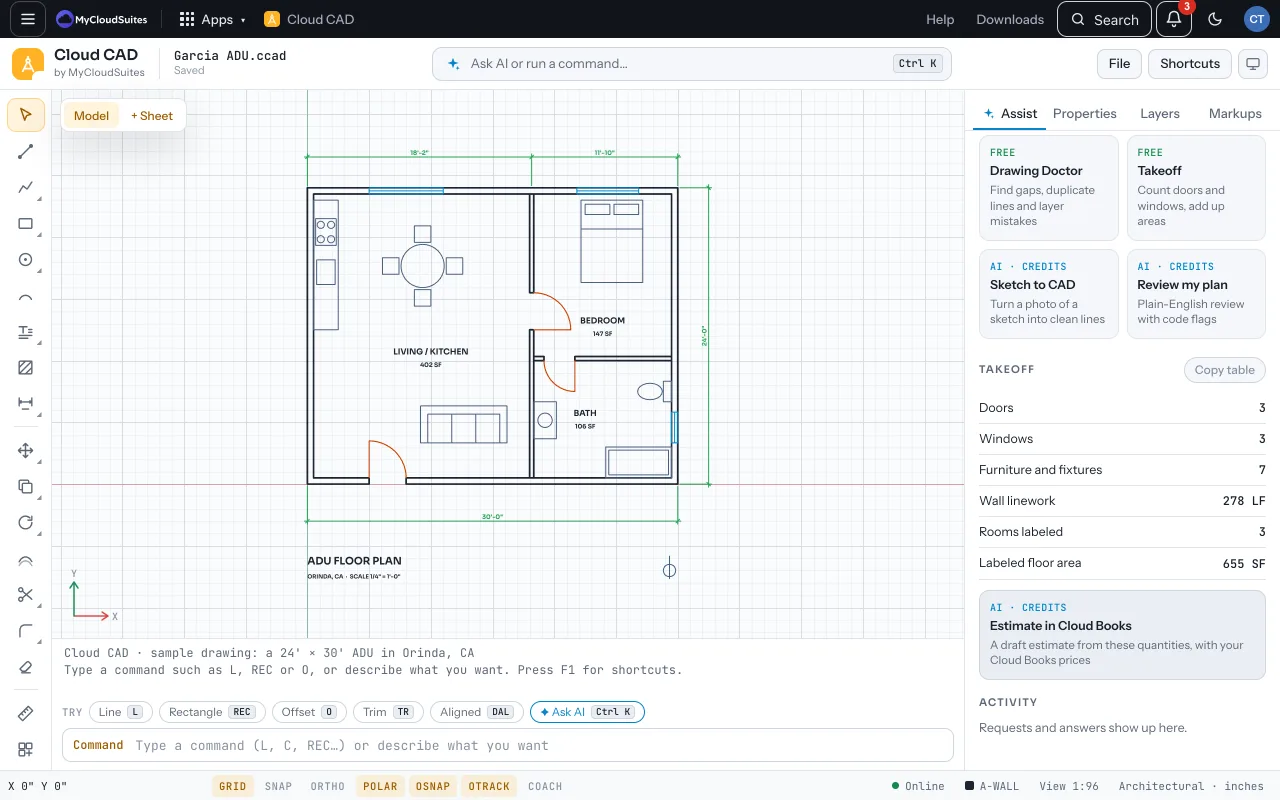
Run it
- Open Assist and choose Takeoff.
- It lists doors by size, windows by size and room areas.
- Copy table puts it on the clipboard to paste into Cloud Sheets or another spreadsheet.
Make an estimate
- Under Takeoff, choose Estimate in Cloud Books. It uses AI credits and shows about how many first.
- It drafts estimate lines with prices from your Cloud Books items and shows them to you.
- Nothing is made in Cloud Books until you choose Make the draft.
Tips
- Doors are counted from door swings on a door layer (like A-DOOR) and windows from a glazing layer (like A-GLAZ). Rooms come from labels like “402 SF”.
Need more? Schedules, or contact us.