

Use Cloud CAD on a phone
Updated November 13, 2026
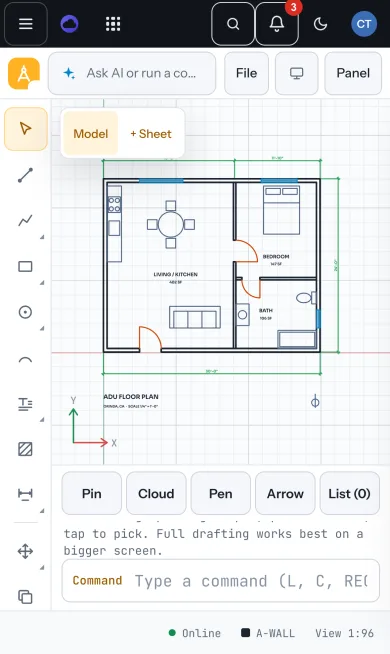
Cloud CAD runs in your phone’s browser at mycloudsuites.com/apps/cad. It’s made for looking at plans, measuring and marking them up on site; full drafting is easier on a bigger screen.
What you can do
- Open a drawing from File › Open from MyCloudSuites… or a file on your phone.
- Pinch to zoom and drag with one finger to pan. Tap an object to pick it.
- Mark it up with the bar under the drawing: Pin, Cloud, Pen and Arrow. List shows every note. See Mark up a drawing.
- Measure with DIST and AREA from the command line.
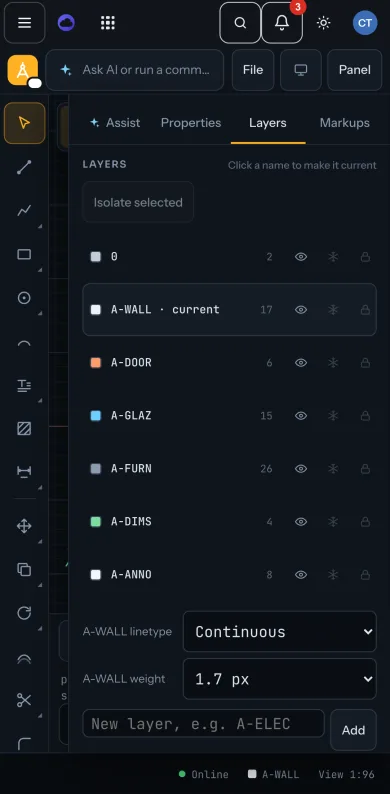
- The panel (Assist, Properties, Layers, Markups) opens from the Panel button.
Tips
- Buttons are sized for a thumb, and fields are large enough that your phone won’t zoom in on them.
- Save to MyCloudSuites so the drawing is the same on your phone and your computer. See Save to MyCloudSuites.
Need more? What works offline, or contact us.