

Use the command line and Ctrl K
Updated November 13, 2026
Cloud CAD works the way drafters expect: type a command, then answer what it asks.
Run a command
- Start typing anywhere, for example L for a line, and press Enter or Space.
- The command line shows what the tool needs next, like “Specify next point”. Click in the drawing or type a value.
- Options are in square brackets, like [Undo]. Type the capital letters (U) and press Enter.
- Press Enter on an empty line, or right-click, to finish. Esc cancels.
- Press Enter or Space again to repeat the last command.
Ctrl K: find anything
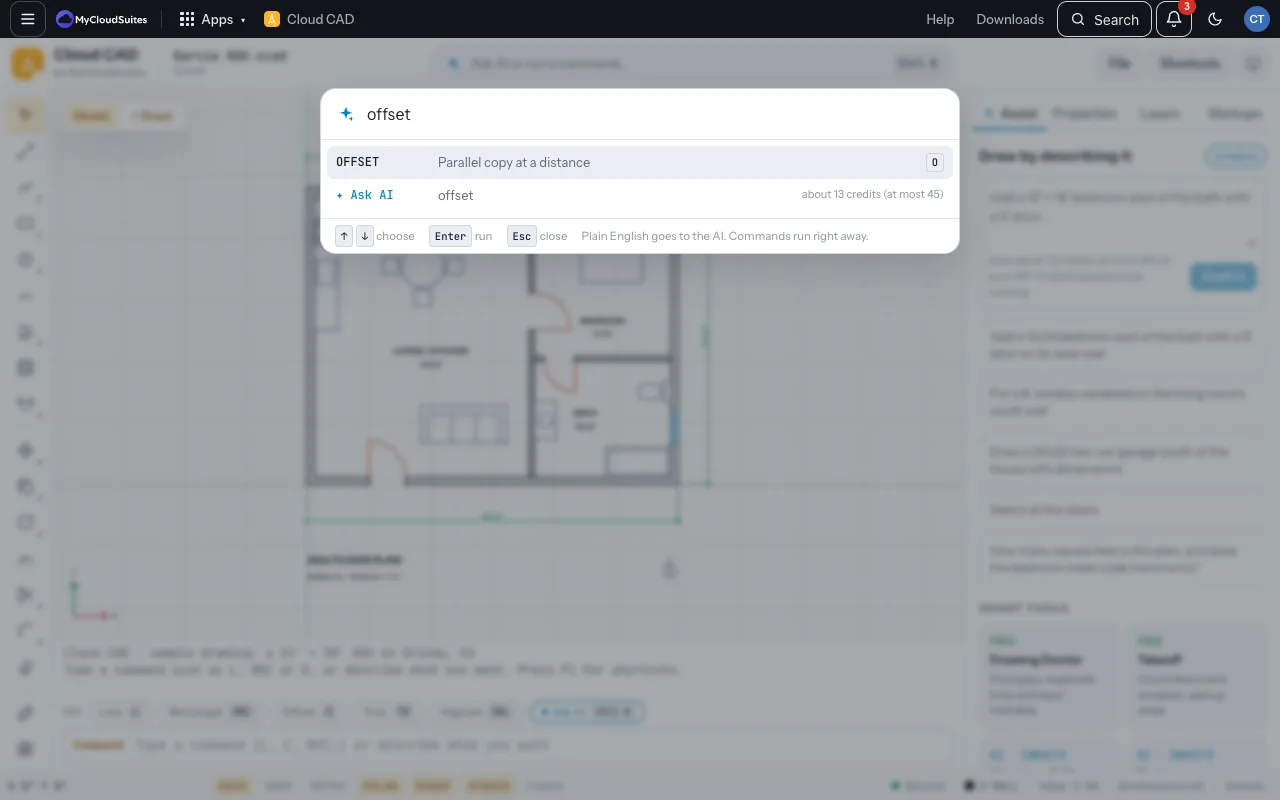
- Press Ctrl K (or click Ask AI or run a command).
- Type part of a command’s name or what you want, like “fillet” or “make a door schedule”.
- Choose a command from the list, or the Ask AI row to send it to the assistant. The AI row shows what it would cost first.
Tips
- Text that asks for words (a layer state’s name, a value with spaces) takes Space as a space. Press Enter when you’re done.
- The full list is in Every command.
Need more? Keyboard shortcuts, or contact us.