

Export a PDF, handouts or notes pages
Updated November 13, 2026
A PDF looks the same for everyone, on any device.
Do it
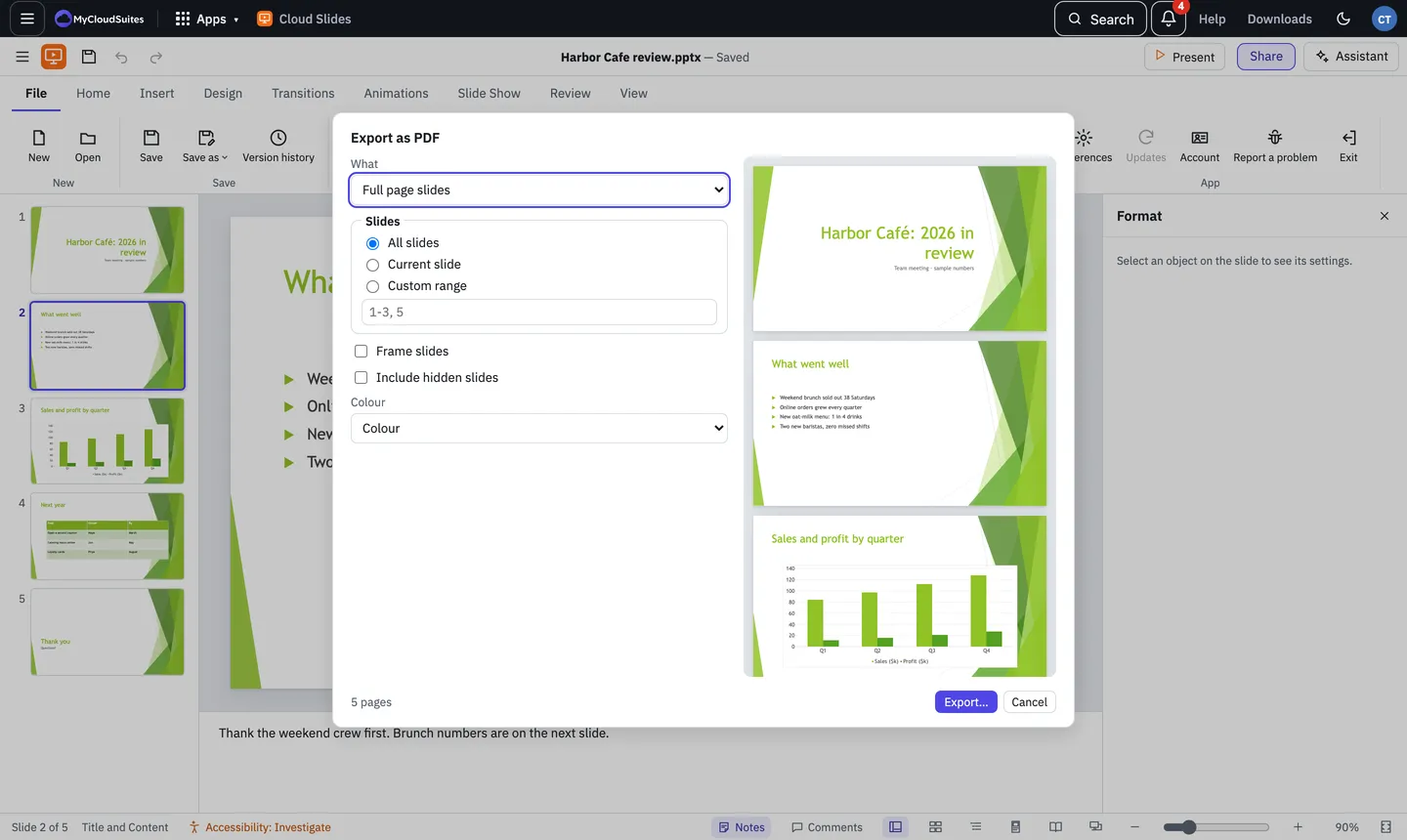
- Choose File › PDF. For handouts straight away, choose File › Handouts.
- Under What, pick Full page slides, Notes pages, Outline or Handouts. For handouts, pick how many slides a page (1, 2, 3, 4, 6 or 9) and their order.
- Under Slides, pick All slides, Current slide or a Custom range such as 1-3, 5.
- Tick Frame slides or Include hidden slides if you want them, and pick Colour, Greyscale or Black and white.
- Choose Export….
Online and on the desktop
- In the desktop app, pick where to save it. Afterwards, Open file or Show in folder.
- Online, your browser’s print window opens with the pages. Choose Save as PDF as the printer, then save.
Links on your slides still work in the PDF.
Need more? Print, or contact us.