

Reminders
Updated November 14, 2026
A reminder is a date on a line, with a bell. When it’s due, Cloud Notes tells you.
Set one
- In a checklist item, type @ and when, for example tomorrow 3pm, friday 9:30 or at 4pm.
- Choose Remind me tomorrow at 3 PM (or whatever you typed).
The line shows the date and time with a bell, and the item shows in What’s left.
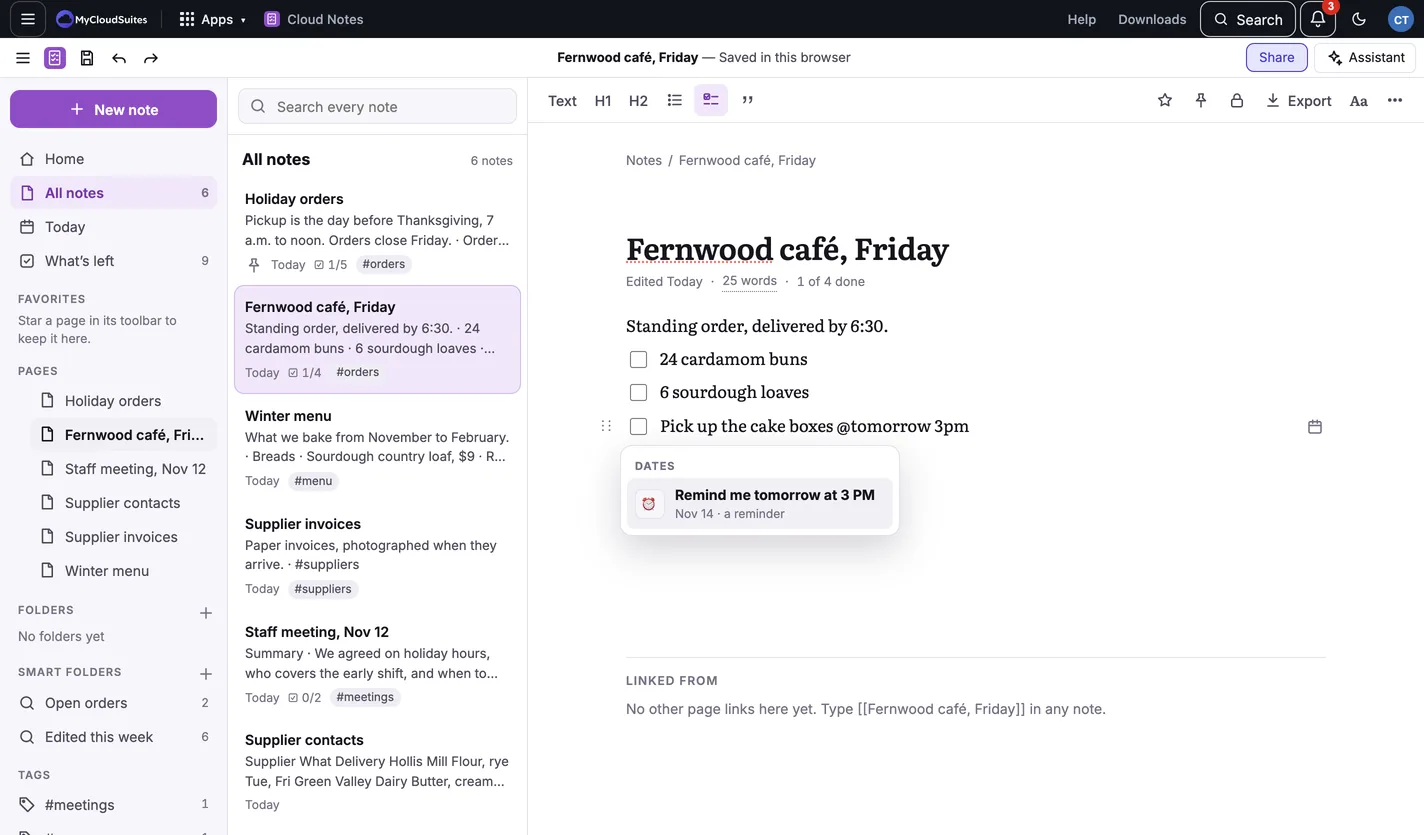
You can also type @ and choose Remind me today, Remind me tomorrow or Remind me next Monday. Those come at your usual time, 9:00 AM unless you change it in Reminder settings.
A time with no AM or PM from 1 to 6 means the afternoon: @tomorrow 3 is 3 PM.
When it’s due
- While Cloud Notes is open, a message says the reminder, and a notification appears if you’ve allowed them.
- In a browser, it can come even with Cloud Notes closed: see Reminders with the tab closed.
In the Mac and Windows apps
In the Mac and Windows apps, reminders come as a notification at their time while Cloud Notes is running, also with its window closed when it’s kept in the menu bar or tray. The first reminder you set asks whether to keep it there.
Need more? Reminders with the tab closed, or contact us.