

Hand in miles driven for work
Updated November 17, 2026
If your company pays for miles, you can hand them in from the website. You’ll only see this when the office has switched it on.
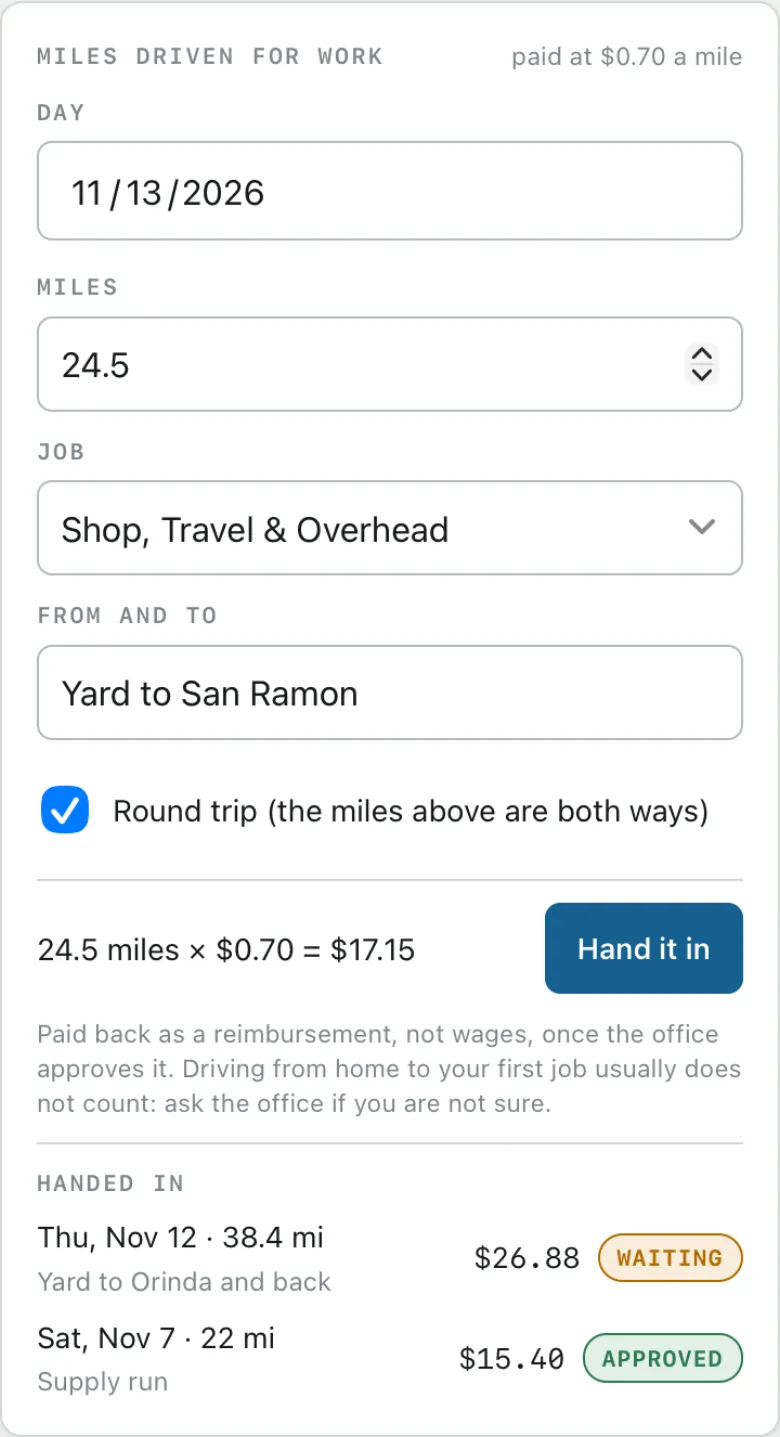
Do it
- Open Cloud Time on the website and go to Me.
- Under Miles driven for work, fill in the Day, Miles and Job.
- Under From and to, say where you drove, for example “Shop to Orinda, and back”.
- Tick Round trip if the miles you typed are both ways.
- Check the total, for example “24.5 miles x $0.70 = $17.15”, and choose Hand it in.
What happens next
The office approves it. Each trip shows Waiting, Approved or Declined under Handed in. It’s paid back as a reimbursement, not wages.
While a trip says Waiting, you can take it back: under Handed in, choose Withdraw next to it and confirm. It comes off your list and isn’t paid. Once the office approves it, it stays.
Driving from home to your first job usually doesn’t count. Ask the office if you’re not sure.