

Draw by describing it (AI drafting)
Updated November 13, 2026
Type what you need in plain words. The AI drafts it with walls, doors, labels and dimensions on the right layers, and nothing changes until you accept it.
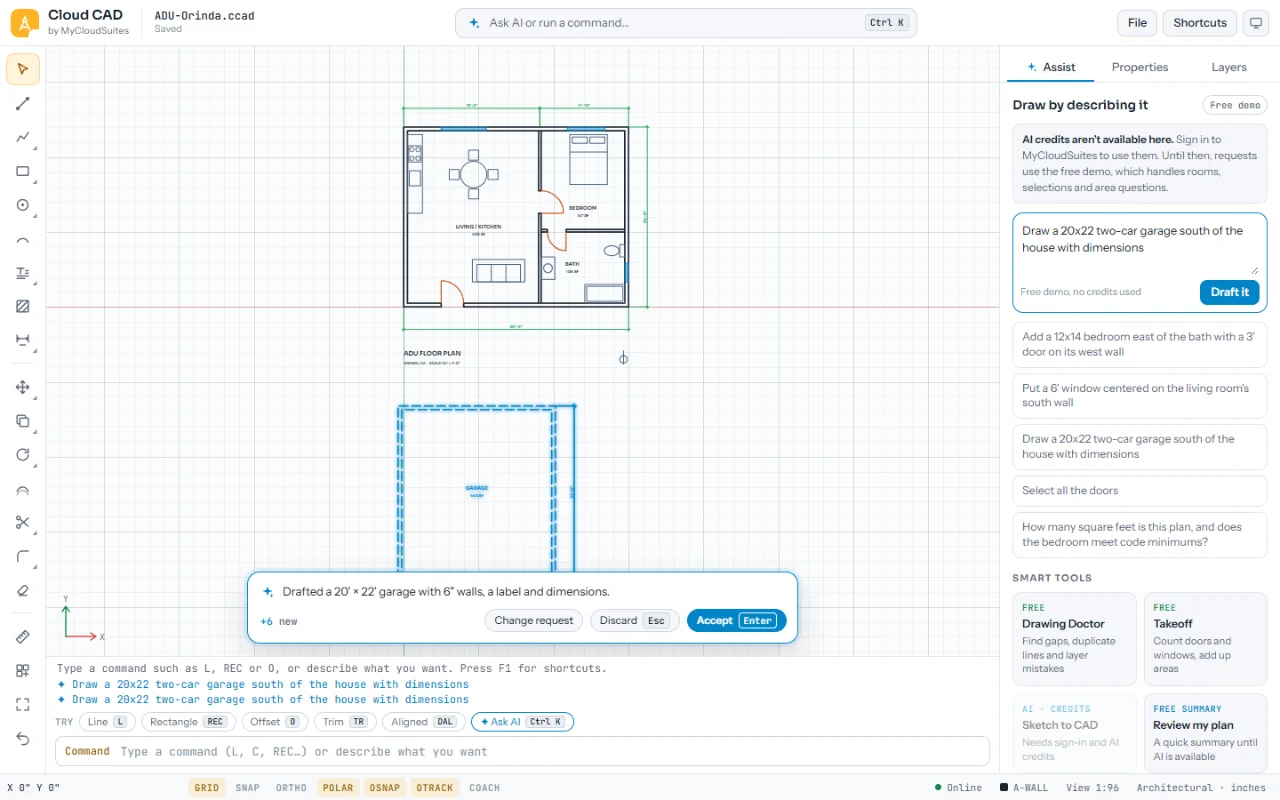
Draft something
- Open Assist. Under Draw by describing it, type a request such as “a 12x14 bedroom east of the bath with a 3’ door”.
- Under the box it says about how many credits it will use, the most it could, and what you have.
- Choose Draft it. Or press Ctrl K, type the request, and choose the Ask AI row.
- The proposal shows in its own color, with a note of what it drew. Choose Accept, Discard, or Change request to ask again. When its plan check finds a problem, the button reads Fix with AI.
What it does well
- Rooms and additions placed against the walls you name, with doors and windows
- Dimension strings around the outside, the way an architect would, kept clear of other things
- Room labels with their areas
- Questions like “how many square feet is this plan?”
Tips
- Name the room it goes against and the side: “east of the bath”, “south of the house”.
- It drafts one room or addition at a time. Ask in steps for a whole plan.
- Signed out or offline, a free demo handles simple rooms, selections and area questions.
Need more? AI credits in Cloud CAD, or contact us.