

What AI costs in Cloud CAD
Updated November 17, 2026
Drawing and every drafting tool are free. Only the AI tools use AI credits, and each one shows what it costs before it runs.
Always free
- Every drafting tool, layers, blocks, markup, sheets, PDF and DWG/DXF files
- Drawing Doctor and Takeoff
Uses credits
- Draft it (drawing by describing it)
- Sketch to CAD (a picture or PDF of a sketch into lines)
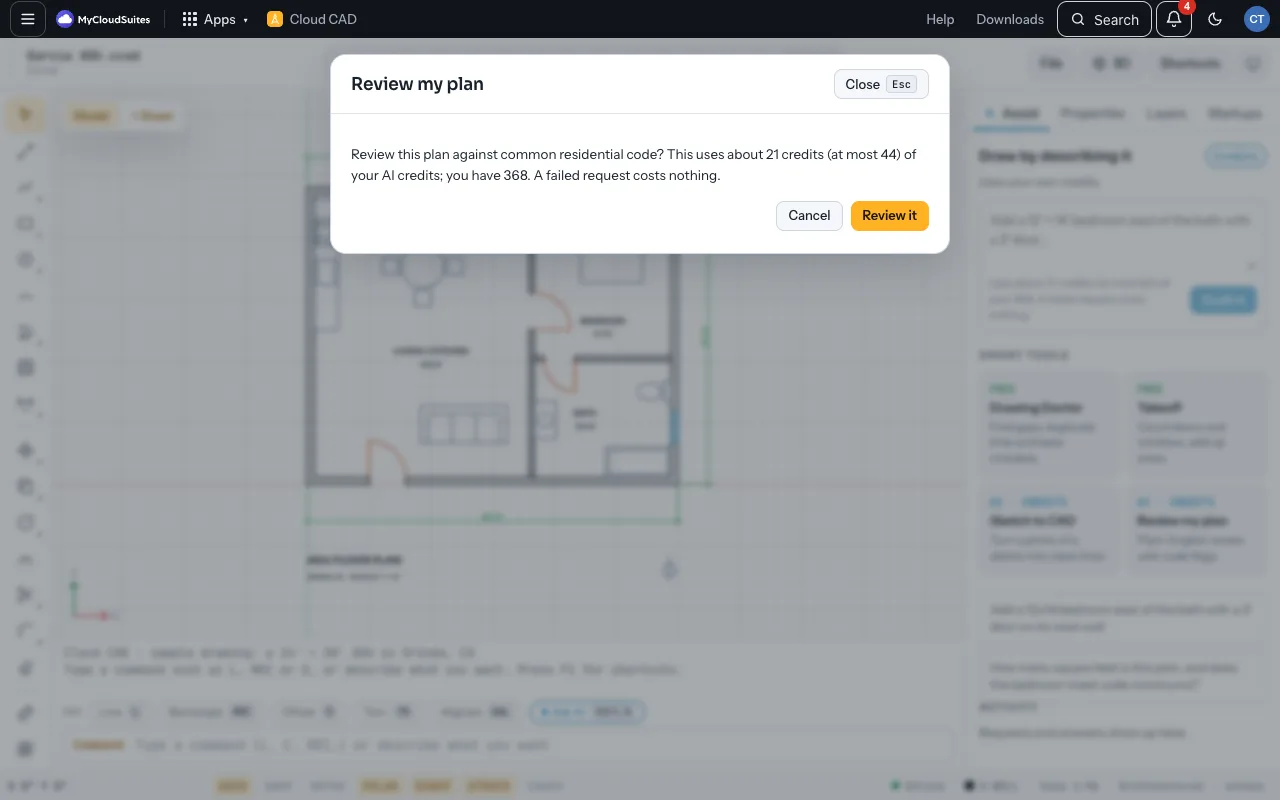
- Review my plan (a plain-English review with code flags)
- Estimate in Cloud Books from a takeoff
Company drawings
A drawing on a company’s drive is company work: the AI tools use the company’s AI credits, up to your monthly allowance, never your own.
- Assist says which credits pay: Uses the company’s credits, with how many you have left this month, or Uses your own credits for your own drawings.
- Before a request runs, it also says it’s paid by the company.
- If the company can’t pay, or your allowance is used up, it says why and nothing is charged. Choose Ask for more, and the company’s owners see it in Needs you.
How the cost shows
- Before a request runs, it says about how many credits it will use, at most how many, and how many you have.
- A request your credits can’t cover isn’t sent.
- A request that fails costs nothing.
Tips
- A short request on a small drawing uses the fewest. A request on the sample plan uses about 21 credits.
Need more? Buy AI credits, or contact us.