

Start with Cloud Notes
Updated November 13, 2026
Cloud Notes is for notes, checklists, linked pages and tables. Every note is a plain Markdown file, so it opens in any text editor too.
Open it
- Go to mycloudsuites.com/notes and choose Open in browser, or choose Download free for the Mac and Windows apps.
- Sign in with your free MyCloudSuites account.
- Your notes open with a Welcome to Cloud Notes note to try things in.
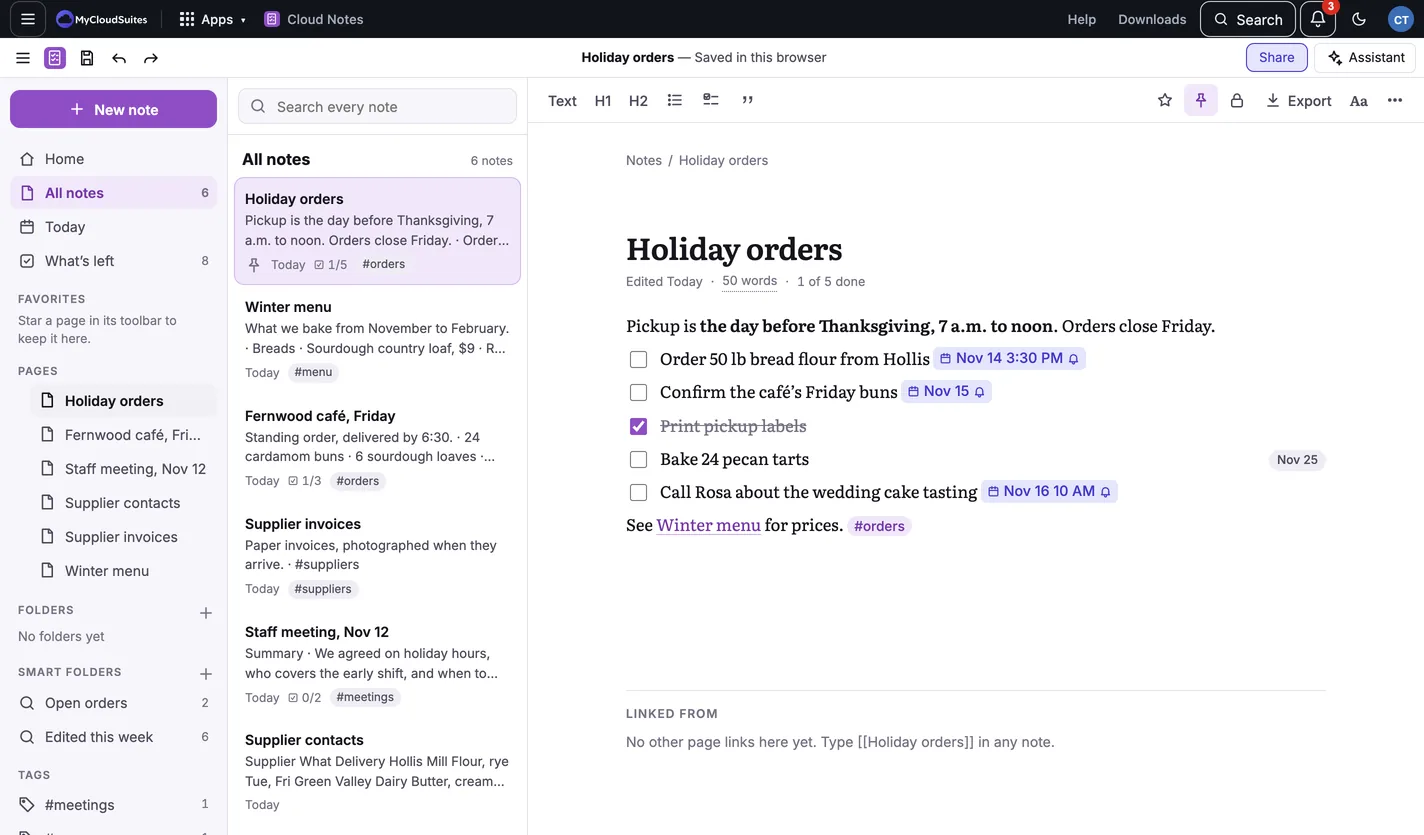
Write your first note
- Choose New note at the top of the sidebar.
- Choose Blank page, or one of the templates.
- Type a title, press Enter, and start writing.
- Type / on an empty line to add a checklist, a heading, a table, a picture and more.
Your note is saved as you type. The top of the window says where: Saved in this browser or Saved to your notes folder.
Find it again
- Search every note, at the top of the list, looks through every note at once.
- What’s left lists every unchecked item in every note, by when it’s due.
- Today opens a note for today.
- Star a page with the star button to keep it under Favorites.
Need more? Where your notes are kept, Write and format, or contact us.