

The assistant
Updated November 13, 2026
The assistant is optional. It uses AI credits or your own Claude key.
Open it
Choose Assistant at the top right of a page.
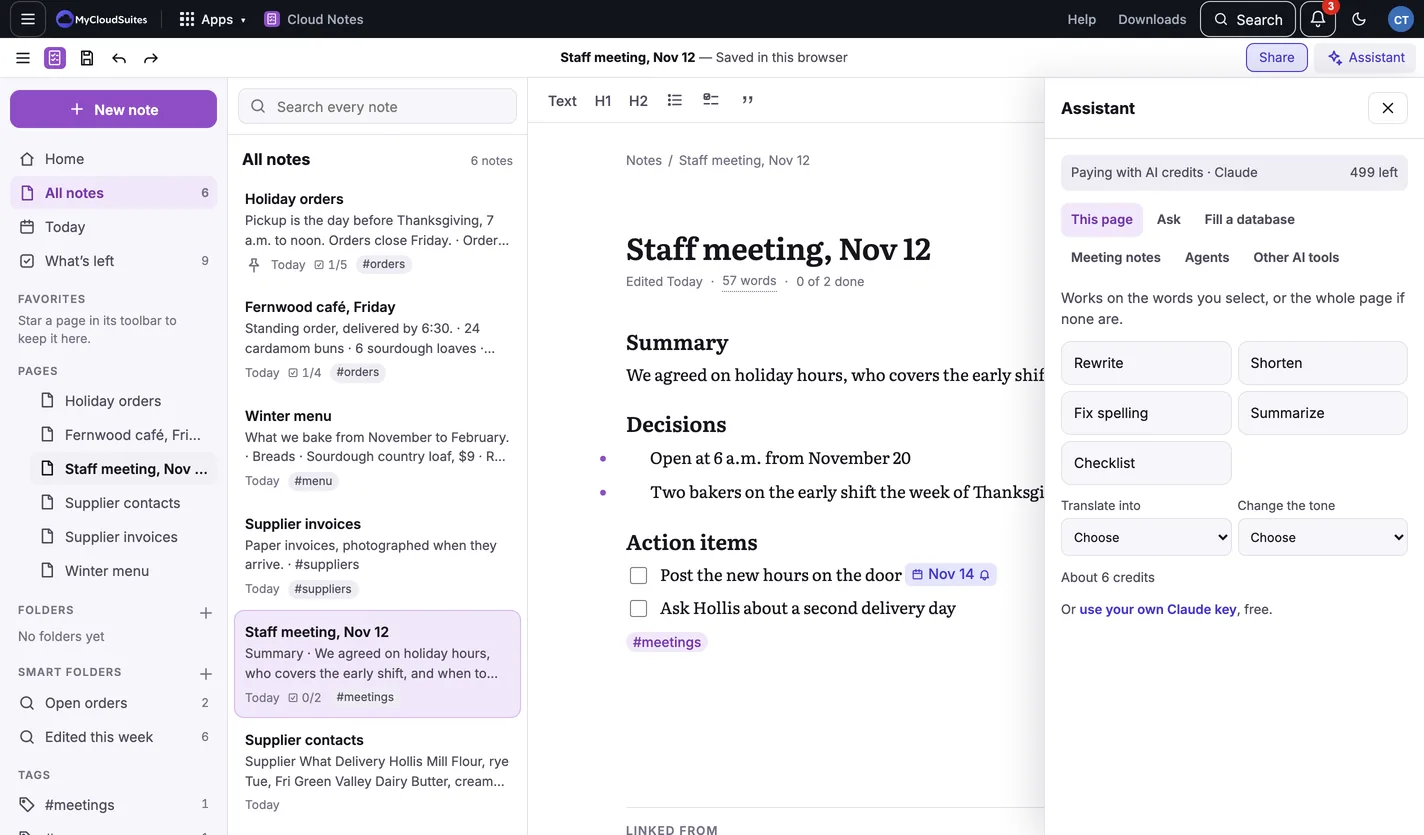
What it does
- This page: Rewrite, Shorten, Fix spelling, Summarize, Checklist (turn a page into a checklist), Translate into and Change the tone. It works on the words you select, or the whole page if none are. Nothing changes until you choose.
- Ask: ask a question about your notes. The answer links to the notes it came from.
- Fill a database: fill a table’s column for every row.
- Meeting notes: record a meeting and get notes. See Meeting notes.
- Agents: jobs the assistant does in your notes when you ask, or on a schedule while Cloud Notes is open.
- Other AI tools: connect other AI apps to your notes, in the Mac and Windows apps.
The cost
Before you run something, it says about how many credits it will use, for example About 6 credits. See What AI costs.
Privacy
Locked notes are never sent to the assistant.
Need more? What AI costs, or contact us.